


Common misconception first: because Phantom runs as a browser extension, some users assume it is inherently insecure compared with custodial exchanges or hardware devices. That claim mixes categories. Security is a set of mechanisms, not a label you can attach to “extension” and leave at that. Phantom’s design choices—non-custodial key control, local key storage, built-in phishing detection, and Ledger integration—change which risks you face and which protections you can apply. Understanding those mechanisms is the quickest way to choose the right installation path for your use case on Solana and beyond.
This article unpacks how Phantom works, what it protects against, where it breaks down, and how it compares with alternatives like MetaMask and Trust Wallet. Along the way I’ll correct three persistent misunderstandings, give practical heuristics for download and install, and close with short scenarios to watch over the next year.
How Phantom’s architecture shapes risk (mechanism, not slogan)
At its core Phantom is non-custodial: private keys or the 12-word seed never live on Phantom servers. That’s powerful: custody remains with the user, eliminating systemic counterparty risk like exchange insolvency. Mechanically, the seed is created and stored locally (or on your Ledger if you pair one). The wallet signs transactions client-side and sends only signed payloads to blockchains. Two practical consequences follow immediately: first, no company help can recover your seed; second, attackers who compromise Phantom’s servers cannot directly steal your keys.
But non-custodial is a trade: responsibility. Lose the 12-word recovery phrase and funds are permanently irretrievable—Phantom offers no recovery service. This is not a hypothetical: the property is a design constraint, not a bug. A second trade manifests in the extension surface: browser-based wallets must interact with webpages, so phishing detection and transaction previews are crucial mitigation layers. Phantom includes both, warning users about known malicious sites and showing smart-contract-level previews before signing. These features reduce, but do not eliminate, the risk of social-engineered approvals or sophisticated contract trickery.
Installation choices: desktop extension vs mobile app vs hardware-backed
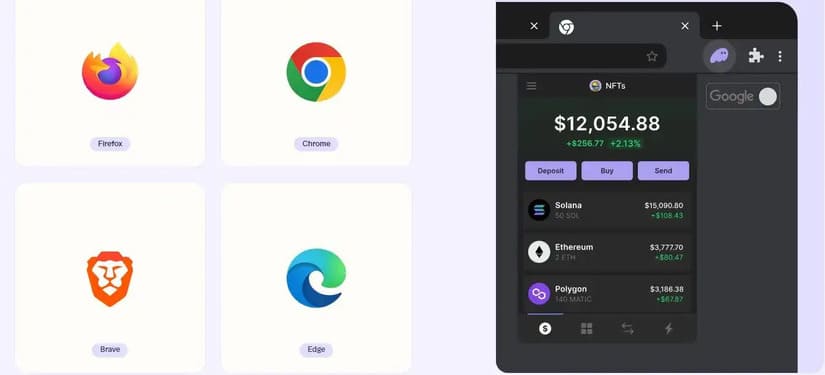
Which installation path you pick matters because it changes attack vectors and convenience. Desktop browser extensions (Chrome, Firefox, Brave, Edge) are highly convenient for DeFi and NFT marketplaces; mobile apps (iOS, Android) add biometrics—Face ID or fingerprint—for daily use. If you need the highest assurance for large holdings, Phantom integrates with Ledger hardware wallets; the critical limitation is that Ledger support is currently desktop-only and limited to browsers like Chrome, Brave, and Edge. For many U.S. users that’s a sensible compromise: daily spending on mobile or extension, cold storage on a Ledger for long-term holdings.
If you’re ready to install, use the official distribution channels and look for package signatures or store verification. For a curated place to begin the browser extension route, see this phantom wallet extension as an installation anchor that links to a vetted location for web users.
Myth-bust: “Built-in swaps are always cheaper and safer”
Phantom offers in-wallet swaps—aggregating liquidity from Jupiter, Raydium, Uniswap and others—and charges a 0.85% fixed fee. That sounds simple, but the mechanism has nuance. Aggregation helps by optimising across pools; however, optimal price does not automatically imply lowest slippage, lowest aggregate gas (or fee) costs, or best routing for complex tokens across chains. For cross-chain bridging, Phantom will route through bridging mechanisms that add time and counterparty risk (bridge smart contracts, wrapped assets). In practice, the decision to use in-wallet swap should be judged by three factors: order size (small trades tolerate the fee better), token liquidity (thin markets increase slippage), and urgency (bridges can be slower and have different failure modes).
Alternatives like MetaMask are oriented toward Ethereum and EVM chains and will use different aggregators and fee structures. Trust Wallet is more mobile-first with different UX trade-offs. The practical heuristic: if you value convenience and single-click UX, Phantom’s swaps are compelling; if you are optimizing fees for large arbitrage-sized trades, route-finding on specialised DEX aggregators outside the wallet may beat the in-wallet experience.
NFTs, staking and multi-chain—what Phantom amplifies and what it obscures
Phantom began as a Solana-native wallet but has expanded to many chains—Ethereum, Bitcoin, Polygon, Base, Avalanche, Binance Smart Chain, Fantom and Tezos—introducing new capabilities and new failure modes. Multi-chain support means you can hold and move assets across ecosystems, and Phantom provides cross-chain bridging. Mechanically, bridging converts assets into representations on the target chain and depends on bridge contracts’ security; that introduces smart-contract and custody-like risk that didn’t exist with purely native transfers.
Phantom’s NFT features—collection-based gallery, floor-price monitoring, spam filtering—are best-in-class for convenience, and staking inside the wallet (native SOL delegation) lets users capture validator yields without leaving the UI. But the trade-off is cognitive overload: a single interface that aggregates many primitives makes it easier to make complex cross-protocol requests without appreciating their different risk profiles. Always inspect transaction previews closely: signatures can request token approvals, wrapped asset creation, or protocol-level delegation—each with distinct consequences.
Where Phantom shines compared to alternatives
– Usability for Solana dApps: Phantom’s UX is tuned for Solana primitives—fast confirmed transactions and predictable fee models—so it’s often the smoothest choice for Solana-native DeFi and NFT marketplaces.
– Integrated NFT tooling: real-time floor prices and gallery view are helpful for collectors managing many assets.
– Hardware wallet bridging: Ledger support on desktop offers a practical path from convenience to cold storage.
Compare that to MetaMask (broader EVM coverage, different aggregator economics) and Trust Wallet (mobile-first, custodial backups optional in some forms): Phantom sits where usability, Solana-first primitives, and a non-custodial mental model meet.
For more information, visit phantom wallet extension.
Limits, boundary conditions, and what to watch next
Key limitations are straightforward: non-custodial means irreversible losses if you lose your seed; Ledger integration is desktop-limited; browser extension surface requires constant vigilance for phishing and malicious dApp requests. The most important boundary condition is the user: technical protections can reduce but not eliminate the risk of signing a malicious transaction. Behavioral controls—cold storage for large sums, using hardware wallets for high-value actions, and verifying sites out-of-band—remain decisive.
Signals to monitor in the near term: continued expansion of multi-chain support (each new chain brings new bridge contracts and security matrices), any changes in Ledger or hardware wallet compatibility, and community activity such as forum usage and user-reported scams. Recent community metrics show active forum engagement—useful for crowd-sourced warnings about scams—but public forums are complementary, not a substitute for robust operational hygiene.
FAQ
Is downloading the Phantom browser extension safe?
Download safety depends on source and process. Use official browser stores or verified vendor pages, check publisher details, and avoid copycat sites. After install, restrict permissions and verify the extension ID if you can. Pairing with a Ledger reduces key exposure because the hardware signs transactions externally.
What happens if I lose my 12-word seed?
Because Phantom is non-custodial, losing your seed generally means permanent loss of access to your funds. Phantom does not offer password recovery or key retrieval. Best practice: write the seed on paper, store it in a secure location (or multiple geographically separated safe locations), and consider hardware-backed secrets for large holdings.
Can I use Phantom for both Solana and Ethereum?
Yes. Phantom has expanded to support multiple chains including Ethereum, but cross-chain transfers use bridges with different security and time characteristics. Treat cross-chain transfers as distinct operations with their own failure modes.
Are in-wallet swaps safe for big trades?
They are safe in the sense that smart contracts and aggregators process the trade, but they are not always the cheapest for large orders because of fixed fee structures and liquidity concentration. For very large trades, consider using specialized routing or OTC solutions and double-check slippage and depth before executing.
Should I use Phantom mobile or desktop?
Use mobile for convenience and daily interactions (biometric auth is helpful). Use desktop with Ledger when dealing with significant values or when interacting with unfamiliar smart contracts. The two together—mobile for everyday, desktop+Ledger for custody—balance convenience and security.
Decision heuristic to keep: treat Phantom as a layered system. For small, frequent interactions prefer the built-in mobile/extension convenience; for larger, high-value operations add a hardware layer (Ledger) and prefer desktop. Always inspect transaction previews; assume that non-custodial equals responsibility. That framework will keep you practical without turning valid caution into paralysis.
Finally, for US-based Solana users wanting a vetted web extension starting point, consider the phantom wallet extension link above as a practical install anchor—then follow the layered security steps described here before moving significant funds.